

Managing inventory in a coffee shop is particularly challenging due to the need to handle perishable goods that have a limited shelf life, such as milk and cream, which must be used quickly to maintain quality and reduce waste. Manual stock control, spreadsheets, manual counts, and intuition leave room for mistakes, losses, and stockouts when you need them least.
Real-time inventory tracking helps restaurants save money by cutting food waste, improving stock management, and streamlining operations, providing instant updates on stock levels and preventing costly mistakes like overordering or running out of ingredients. For coffee shops in particular, stock control is especially important: perishable products with a short shelf life, like milk and cream, must be used quickly to avoid losses.
This article shows how to go about monitoring stock levels via cafe POS system and which features to focus on.
What You’ll Learn
- What the cafe POS system can do in terms of inventory tracking, and why it differs from regular inventory tracking.
- Which components make the most impact on inventory control and reducing waste.
- How to configure the system for stock tracking, par levels, and automatic alerts.
- How to manage inventory across multiple locations and reduce shrinkage.
What is POS Stock Monitoring for Cafes?
A POS system for cafes combines software and hardware designed to manage cafe operations and serve as the primary place where sales happen, customer orders are placed and modified, and receipts are generated. However, a good cafe POS system today does much more than process transactions; it serves as the hub of your inventory management system.
When your barista sells an oat milk latte, a well-configured POS system does more than record the transaction. It decreases your milk inventory, your coffee bean inventory (depending on the quantity in your recipe), and your syrup inventory if you add an extra service. POS system should allow for monitoring of your ingredient levels for the purposes of monitoring how much of which ingredient is used in each menu item. That is the difference between regular inventory monitoring and actual stock monitoring.
A well-designed cafe POS system helps manage inventory in real time, letting cafe owners track ingredient stock and avoid running out, which is crucial for maintaining service quality. Restaurants using real-time inventory tracking systems often see an average 4% reduction in food costs because they can better track and manage stock levels.
Why Inventory Tracking Matters for Cafe Operations
Real-time inventory tracking helps restaurants save money by cutting food waste, improving stock management, and streamlining operations, providing instant updates on stock levels and preventing costly mistakes like overordering or running out of ingredients. Restaurants using real-time inventory tracking systems often see an average 4% reduction in food costs due to better visibility and management of stock levels. Real-time inventory tracking systems combine tools like barcode scanners, mobile apps, and cloud software to provide real-time updates, helping businesses lower food costs and improve efficiency.
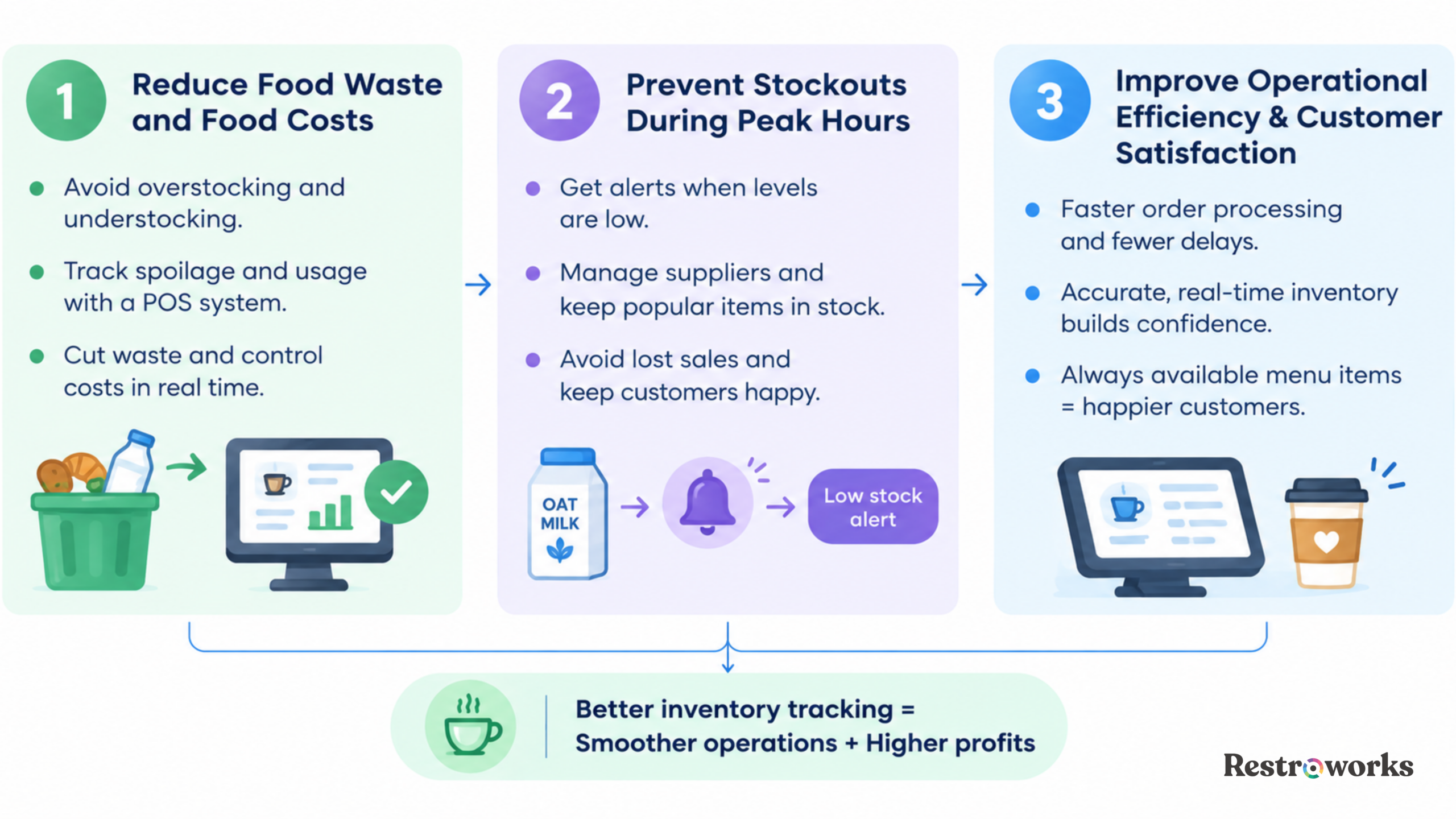
Reducing Food Waste and Food Costs
Finding the right balance between too much and too little inventory in coffee shops is vital, since overstocking can cause waste while understocking leads to lost opportunities. Each bag of spoiled coffee, each unsold pastry, and each unopened bottle of expired milk adds to costs.
Waste management features in a POS system track ingredient spoilage and report usage trends, aiding cost control in café operations. Restaurants that use real-time inventory management tools can minimize food waste and cut costs, making them among the most effective tools for a coffee shop owner.
Preventing Stockouts During Peak Hours
One of the most damaging things that can happen to customer satisfaction at your coffee shop is running out of oat milk at 8 am on a Monday morning. Automated notifications will alert you when your supply levels fall below par. You’ll know what is low in inventory before a rush happens, not after you have lost customers. Fluctuating customer demands, influenced by trends and seasonal changes, complicate inventory management in coffee shops, making it difficult to predict stock requirements accurately.
Implementing effective supplier management is critical for coffee shops, as it ensures a reliable supply of inventory and helps prevent stockouts of popular menu items.
Improving Operational Efficiency and Customer Satisfaction
The right cafe POS system can significantly improve how smoothly a business operates by increasing order accuracy, reducing wait times, and enabling upselling prompts, ultimately increasing average order value and customer retention. Accurate, real-time inventory data speeds ordering decisions, boosts staff confidence, and reduces the operational friction that slows service during peak hours.
Effective inventory management directly affects customer satisfaction—when menu items are consistently available, served correctly, and priced accurately, the experience improves with every interaction.
How Cafe POS Systems Track Inventory in Real-Time
A café POS system is an integrated blend of software and hardware designed specifically to streamline and manage café operations, serving as the primary location for handling sales transactions, taking and modifying customer orders, and generating receipts. Modern café POS systems improve customer satisfaction, expedite daily tasks, and establish the foundation for sustained business expansion by providing features like fast order entry, customizable menus, and loyalty programs. A well-designed café POS system helps manage inventory in real time, allowing café owners to keep tabs on their stock of ingredients and avoid running out of them, which is crucial for maintaining service quality.
Recipe Costing and Ingredient-Level Tracking
The most powerful inventory control technique in a cafe POS system is recipe-level tracking. When you set up a latte recipe in your POS that requires 8oz of milk, 18g of espresso, and 0.5oz of vanilla syrup, the system automatically deducts those exact amounts from your stock each time you sell one. Real-time inventory control systems integrate devices such as barcode scanners, mobile apps, and cloud software to provide immediate updates, helping organizations reduce costs and streamline operations.
POS systems should enable ingredient-level tracking to monitor specific quantities of ingredients used for each menu item. Comparing theoretical versus actual variance helps uncover the sources of problems linked to over-portioning and theft.
Setting Stock Level Thresholds and Automated Low Stock Alerts
Setting par levels (the minimum levels required to meet customer demand while avoiding waste) is one of the best ways to optimize inventory. Setting par levels in your cafe POS system means setting a minimum stock threshold for each ingredient that triggers a warning when stock drops below safe levels.
The formula for computing the reorder threshold is: (daily consumption rate * number of days required to receive supply from the supplier). Therefore, for coffee beans, if the daily consumption is 3kg and the supplier delivers every 4 days, your reorder level would be set to 12 kg with an additional 3-day buffer level, making the reorder level 15 kg; not just any random number such as “order when we have 5 bags left.” The formula differs depending on the category of the ingredients: Milk would need a 1-day buffer owing to its perishable nature, dry ingredients a 5-day buffer, and modifiers a 3-5 day buffer.
The forecasting function of a POS system uses past sales data to predict future needs for optimizing stock. This function should be used in tandem with the par levels to take into account forecasted peaks.
Kyle Mark appeared on the Restrocast Podcast and talked about how technology is essential in the food business.

Key Inventory Management Features to Look For in a Cafe POS
Inventory optimization is the process of managing stock levels to balance supply and demand, which is crucial for maintaining customer satisfaction and operational efficiency in coffee shops. The right café POS system can significantly impact how smoothly a business operates by improving order accuracy, reducing wait times, and enabling upselling prompts, ultimately helping to increase average order value and customer retention.
Real-Time Inventory Tracking
POS systems vary in how much detail they use for inventory management. Simple systems record final-product sales: how many croissants came out of the display case, how many lattes were sold. More advanced systems track the ingredients consumed in each transaction. For a coffee shop with many modifiers per order, this is the only way to generate meaningful inventory data.
Low Stock Alerts and Automated Notifications
Automated low-stock alerts inform managers when supplies fall below predefined par levels, facilitating timely reordering. Look for a cafe POS system that allows you to configure alerts by channel, a push notification to a manager’s phone for critical items like coffee beans and milk, and a weekly summary for lower-priority dry goods. Alert fatigue is a real risk: if your system generates 20 alerts per day, staff will start ignoring them. Prioritize by financial and operational impact.
Multi-Location Inventory and Multi-Location Management
Cloud POS systems can collect inventory information across multiple locations, enabling transfers between locations and ongoing stock control. If your business involves more than one location for coffee shops, then multi-location inventory will allow you to look at inventory levels from all locations on one screen, identify the shortage of inventory before a stockout occurs, and make arrangements for transfer from one location where there is extra inventory to another that has a shortage of inventory.
Inventory Management Software Integration and Third-Party Apps
There are various systems with which cafe POS may be integrated. These include, but are not limited to, loyalty systems, self-service kiosks, and online ordering systems. You can also integrate your inventory management system with your cafe POS system to add extra inventory control features, such as dedicated purchase order management, supplier cost tracking, and food cost analysis. Integration opportunities include third-party applications, accounting software such as QuickBooks or Xero, and online ordering systems.
Mobile Apps and Remote Access
Modern POS systems used in cafes ensure live synchronization, price updates, and remote stock rerouting, providing a new level of data-tracking capability. The mobile application that lets you track inventory in real time allows cafe owners and managers to monitor stock levels at any time, whether ordering from a supplier while staying at home or checking another cafe’s stock without going there. This remote access to stock management should now be standard in a cloud-based POS system.
Detailed Reporting and Demand Forecasting
Demand forecasting in the POS system helps predict future inventory needs based on historical sales data to maintain optimal stock levels. When choosing a POS system for a cafe, look for reporting that tracks ingredients used by day, week, and daypart—all this information is essential for efficient seasonal planning.
How to Set Up Stock Monitoring in Your Cafe POS
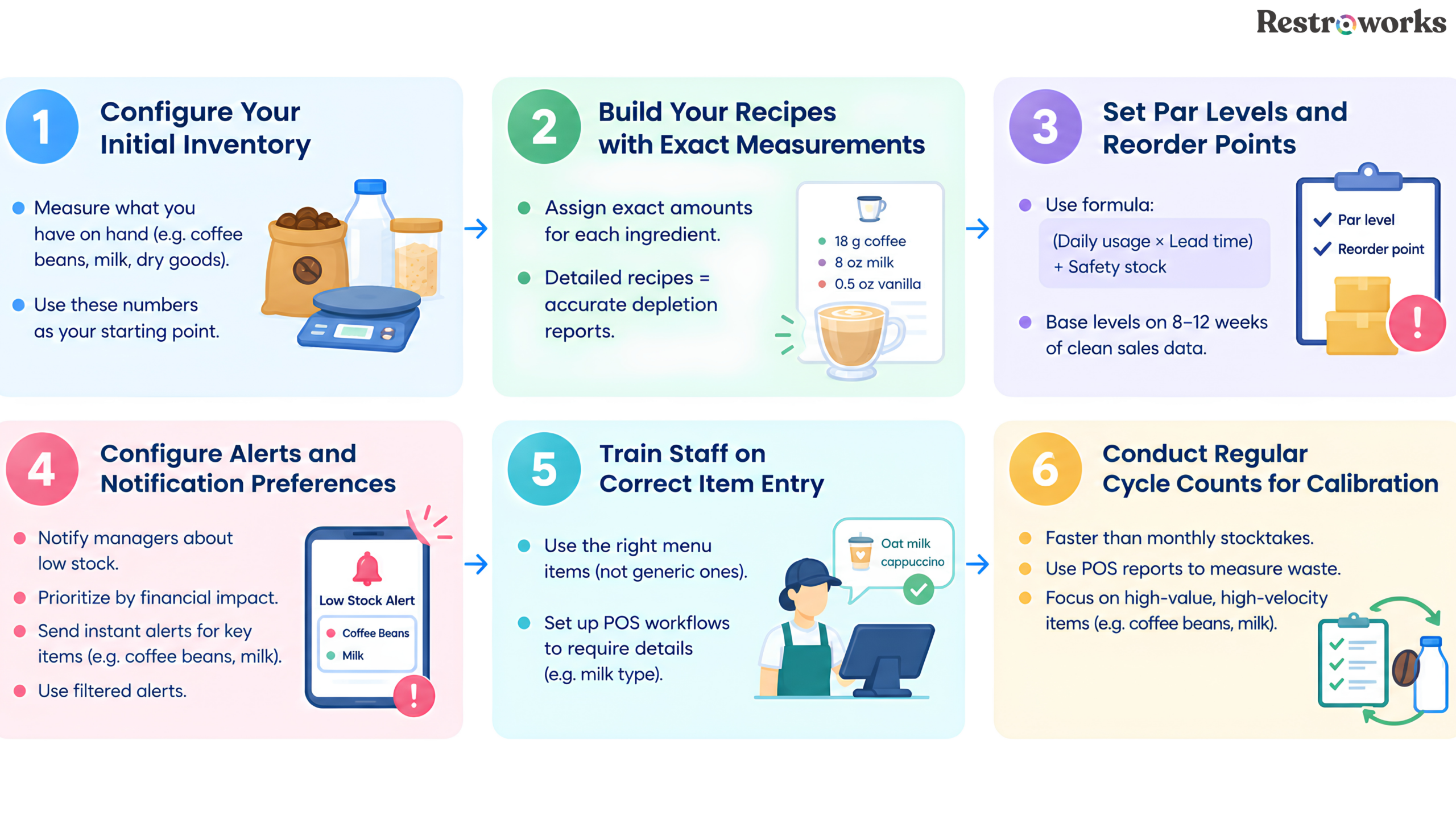
Demand forecasting in a POS system can predict future inventory needs based on historical sales data to optimize stock levels.
Step 1: Configure Your Initial Inventory
Prior to the ability for the system to monitor your stock levels, you need to provide the exact details of the ingredients you have in stock right now. Measure every ingredient you have on hand, from kilograms of coffee beans to gallons of milk and packages of dry goods, and use that as your starting point.
Step 2: Build Your Recipes with Exact Measurements
For each menu item, assign the exact amounts of each ingredient. A vanilla latte isn’t just “coffee and milk”; it is 18 grams of coffee beans, 8 ounces of whole or alternative milk, and half an ounce of vanilla syrup. Without detailed recipes, you will have no accurate ingredient depletion reports.
Step 3: Set Par Levels and Reorder Points
Set the par level (minimum quantity of goods you should always have) and reorder point (quantity of goods where an alert occurs) for each item. Calculate the following: (daily usage × lead time) + safety stock. Set up the par levels based on a minimum of 8 to 12 weeks of clean sales history since your sales fluctuate weekly and seasonally. If you start inventory tracking in November using holiday sales as the basis, you’ll experience stockouts every month, since January sales will be lower.
Step 4: Configure Alerts and Notification Preferences
Low-stock alerts will notify your managers of supply shortages and remind them to reorder. In the alert section of your cafe POS, prioritize messages based on their financial impact. Instant alerts will be sent regarding coffee beans and milk only. Napkins and stirrers will not require any alerts.
Step 5: Train Staff on Correct Item Entry
Recipe logging works best when staff rings up the right item. For example, using a general button for “coffee” instead of “oat milk cappuccino” will make the depletion of your ingredients from that particular transaction irrelevant. Creating workflows within your point-of-sale system that force staff to specify the milk type is better than trying to teach staff alone; however, both steps are needed.
Step 6: Conduct Regular Cycle Counts for Calibration
Cycle counts are faster than monthly stocktakes and, when combined with POS reports, can measure waste effectively. During the initial setup process, do cycle counts for products with high velocity and value (e.g., coffee beans and milk) on a daily or bi-daily basis, comparing the number of products on hand to the quantity recorded in the POS system. Such calibration will show you where the issue lies and how to fix it.
INDUSTRY INSIGHT
For coffee shops, this means these inventory management capabilities are more readily available and cheaper than ever, with features like depletion at the ingredient level, AI-driven demand forecasts, and stock tracking via mobile devices that were once exclusive to enterprise restaurant groups.
Identifying Stock Variance and Reducing Shrinkage
It is not just a matter of stock discrepancies. This is something much more serious. Theft costs the restaurant industry billions of dollars each year, and employee theft accounts for about 75% of all inventory shrinkage and 4% of revenue loss. However, in cafes, most variance isn’t theft; it’s over-portioning, spillage during the rush, and recipe drift.
Comparing theoretical and actual inventory variances helps uncover problems related to over-portioning or theft. For instance, if your POS system shows you should have 8 kilograms of coffee beans left, but you find only 6.5 kg on the physical count, you need to investigate why you are 1.5 kg short. At $25 per kilogram, you are losing $ 37.50 per week on one ingredient alone, which amounts to $1,950 annually, and it doesn’t even account for other ingredients.
Using barcode scanning technology in a POS system enhances accuracy in inventory audits by minimizing human error. Do physical inventory counts either before opening or after closing hours, never during business hours, when ingredients are actively in use. A mid-shift milk count will always show a shortage because pitchers are in use and quantities cannot be measured accurately.
Using Stock Data for Smarter Purchasing Decisions
A cloud-based POS system can centralize data for multi-location cafes, allowing for inventory transfers and consistent stock monitoring. Setting par levels, which are the minimum amounts of stock needed to meet customer demand without waste, is an effective strategy for inventory optimization in cafes.
Seasonal and Promotional Stock Planning
Changing trends and seasons create challenges for coffee shops when managing inventory because it becomes hard to estimate stock needs. POS inventory records are your most useful resource for seasonal planning. As you near pumpkin spice season, last year’s POS inventory will show how quickly you used pumpkin syrup each week and how milk consumption changed during that spike.
Cafes can use POS records to identify seasonal spikes and manage inventory and promotions accordingly. Seasonal orders should be based on your historical records.
Integrating Supplier Management and Purchase Orders
Effective supplier management is crucial for coffee shops because it helps ensure timely inventory and avoids stock-outs of your best-sellers. Some POS systems and integrated inventory management systems can automatically place a purchase order when inventory drops to a set level. When using this feature, consider adding one more step, an approval process, to prevent data-entry mistakes.
Multi-Location Inventory Control for Cafe Chains
The cloud-based POS system consolidates information across cafes, helping transfer stock and track it. Multi-location inventory visibility helps a manager overseeing three cafes see from one dashboard which location has a cold brew concentrate shortage, which has extra whole milk that will soon expire, and whether it’s better to transfer stock rather than order from a supplier.
Inventory optimization controls inventory levels in relation to demand and supply. This optimization is only possible when the inventory management system provides consolidated reports rather than requiring managers to prepare reports separately.
Best Practices for Monitoring Stock Levels in Cafes
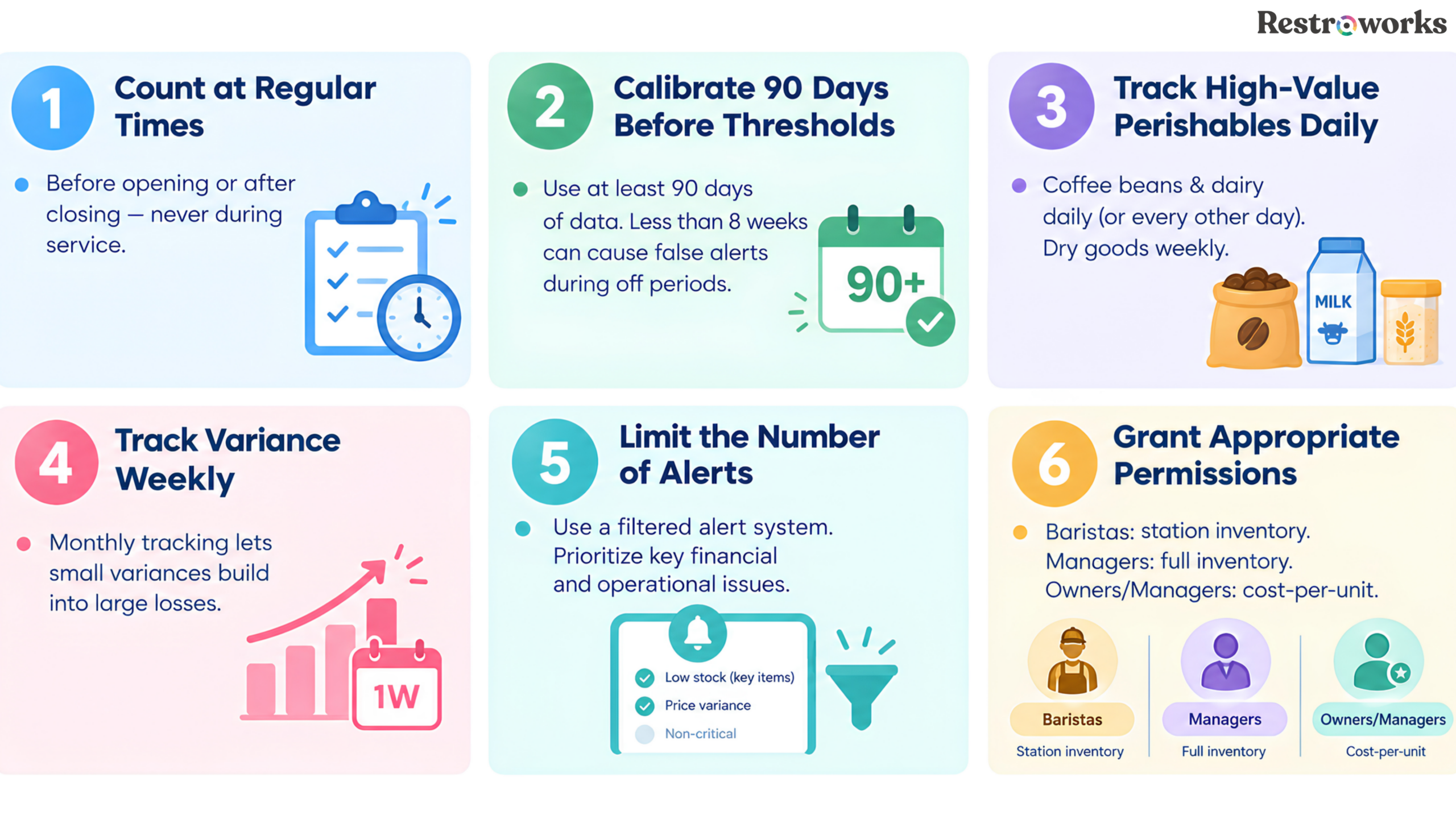
Best practices for monitoring stock levels in cafes:
- Count at regular times. Conduct physical counts before opening or after closing, but never during service when ingredients are being used.
- Calibrate at least 90 days before using any thresholds. Setting up par levels from less than 8 weeks’ worth of data will fail to consider weekly cycles and result in false alerts during off periods.
- Track high-value perishables on a daily basis. Count coffee beans and dairy daily and/or every other day during preparation, but count dry goods only weekly.
- Perform variance tracking on a weekly basis, not monthly. Monthly variance tracking lets small variances build into large losses.
- Limit the number of alerts sent out. The best inventory alerting system is a filtered one; prioritize key financial and operational issues.
- Grant appropriate permissions. Allow baristas to access their station’s inventory status. Grant managers access to full inventory. However, cost-per-unit data should be available only to owners and managers due to wage concerns.
Integrating Stock Monitoring with Accounting Software
Regular audits of inventory are essential for coffee shop owners to identify which ingredients are tying up capital and to prevent waste, ensuring that inventory levels are aligned with actual usage. Inventory data from your POS system will automatically link to your Cost of Goods Sold because you are using an integrated POS system in your cafe.
A cafe POS that exports to your accounting system eliminates manual journal-entry errors and lets your cost of goods sold be based on actual ingredient usage, in addition to invoice data. It also makes it possible for your accountant to get the actual food cost percentage at period end.