

G. Table Reservation and Management
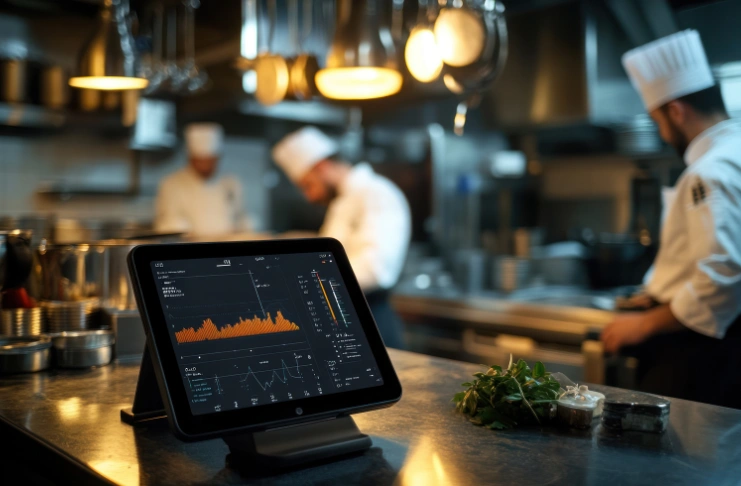
Table management gives you a real-time view of your dining capacity, so you always know table availability, bookings, and turnover times. This makes it easier to plan seating across service hours without crowding the floor or leaving tables underutilized.
It also keeps reservations, walk-ins, and table status visible in one place, which helps the front-of-house team stay coordinated during busy shifts and manage guest flow more smoothly.
H. Customer Relationship Management and Loyalty Programs Integration
Every customer interaction is an opportunity for growth. With customer relationship management (CRM) and loyalty programs, you can capture key customer data – contact details, order history, customer preferences, average check size, and more to personalize their experience.
A strong CRM system helps modern restaurants build better customer relationships by creating a complete profile of each guest. This information helps you understand customer behavior, tailor promotions, and deliver personalized service that keeps guests coming back.
It also integrates loyalty programs with your modern POS system, so rewards, points, and offers are applied automatically during billing. Customers don’t have to remember anything, and your staff doesn’t have to manage it separately as the system handles it as part of the transaction.
I. Sales and Financial Reporting and Analytics
Centralized reporting and analytics features bring together actual operational data from across the restaurant. Instead of pulling numbers from different sources, you get a consolidated view of restaurant and staff performance. With comprehensive reporting and advanced analytics, you have-
- Consolidated reports across all locations
- Visibility into sales data, costs, and key performance metrics
- Easy comparison of outlet-level performance
- Real-time access to operational data
- Accurate insights for faster, more informed decisions
Guide to Restaurant Management Software Selection and Vendor Evaluation

Choosing the right restaurant management software for a chain comes down to one question: Will it still work as efficiently as it does now when you add more locations, more data, and more operational complexity?
Which means, it requires a different lens than evaluating tools for a single outlet. Your new restaurant management system should support consistency across locations while still giving you visibility and control at both the outlet and brand level. Here’s what you need to evaluate in a chain-ready system-
- Multi-location restaurants are supported with outlet-level controls and centralized visibility.
- Consolidated reporting with the ability to compare performance across locations
- Centralized menu, pricing, and inventory management across outlets
- Role-based access and permissions for different teams and locations
- Real-time data synchronization across all outlets
Spend some time evaluating options based on user reviews, vendor credibility, or live demos. This will ensure you invest in the right tool, which doesn’t introduce operational gaps or force you to rework existing processes.
Vendor Evaluation Checklist
The vendor you choose will shape how smooth your rollout and day-to-day operations turn out. Use this checklist to evaluate whether they can support your chain at scale-
Contract Negotiation for Chain Implementations
You have found the right tool and the vendor. But are you getting everything you’ve wanted? This is where you need to negotiate contract terms and pricing to get the best out of your system.
Most restaurant management software vendors offer tiered, usage-based, or per-user/location pricing models. With multiple outlets, software costs will add up fast, so it’s always worth understanding what the costs will look like for your restaurant business as you expand.
For starters, look beyond the base plan and check what the cost covers—number of outlets, users, transactions, or feature access. It also helps to clarify what’s included upfront and if, onboarding, additional modules, integrations such as with delivery platforms, accounting software, loyalty programs, etc., will cost extra.
Further, support terms matter just as much. SLAs should clearly define timelines for implementation, response, and issue resolution. When several outlets rely on the same system, even a small delay can slow things down on the ground.
Reviewing and negotiating your contracts early keeps expectations clear and avoids unnecessary issues once the system is live across locations.
Restaurant Chain Management Software Implementation Guide: Multi-Location Rollout Strategy
Rolling out the custom restaurant management software is all about control. Because you’re introducing a system into live restaurant operations. Orders are still coming in, teams are still working, and every outlet has its own rhythm.
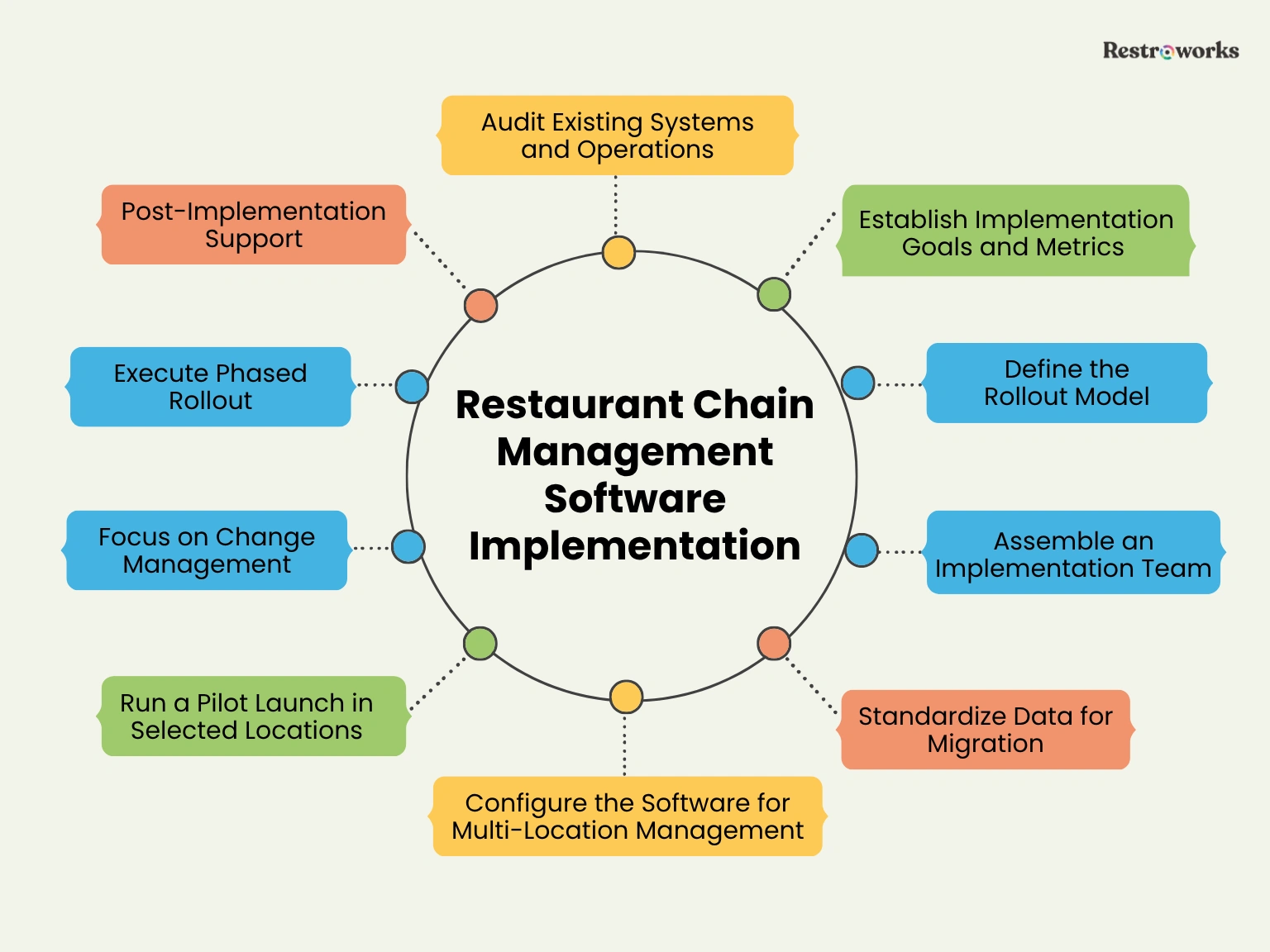
So the focus shouldn’t be on going live as quickly as possible. But to implement this without creating confusion across locations. That involves the following step-by-step implementation process-
1. Audit Existing Systems and Operations
You can’t standardize your operations until you map how each outlet actually works. Start by reviewing the day-to-day processes of each location and the systems they currently use. This includes checking-
- How are orders taken and recorded?
- How frequently is inventory tracked—daily, weekly, or whenever feels ‘right’?
- How does the front-of-house communicate with the back-of-house?
- Where do teams rely on manual work the most?
As you go through this, two things will stand out. First, the gaps, such as delays, errors, or workarounds. Second, the variations — how different outlets handle a similar process in different ways.
Both are important to successful implementation.
2. Establish Implementation Goals and Success Metrics
Before you get into timelines or configurations, take a step back and define what you actually want this system to improve. Not in broad terms like “better efficiency,” but in specifics you can actually track.
- Are you trying to reduce food cost variance?
- Do you want faster, more reliable reporting?
- Do you want better insight into ingredient usage and inventory management?
Without that clarity, you may end up focusing on features that don’t offer anything meaningful. Based on your operational audits and requirements, you can define what success looks like. That could be-
- Food waste reduction
- Real-time, accurate reports
- Fewer billing or ordering errors
- Faster and improved service quality
This step sounds basic, but it is important to keep the rollout focused.
3. Define the Rollout Model for Restaurant Operations

Once you understand your current setup, decide how you want to introduce the system across locations. There’s no single right answer, but there is a wrong one: rolling it out everywhere at once without testing it.
There are a few common ways to approach the rollout, and each one comes with its own trade-offs-
- Pilot rollout: Start with a single outlet and use it to test configurations, workflows, and team adoption before moving further.
- Phased rollout: Roll out in stages, either location by location or in small groups, so you can adjust as you go.
- Full rollout: Launch across all outlets at once. While it is faster, it leaves very little room to correct issues once things are live.
In most cases, a pilot followed by a phased rollout is a good way to go about it. It slows the process slightly at the start, but helps you avoid larger disruptions when the system reaches all locations.
4. Assemble a Cross-Functional Implementation Team
Software implementation for all your restaurants is not an IT-led project only. The system will affect how operations, finance, inventory, and service teams work every day. So you want people from each of these areas involved from the start.
Involve key staff members who understand both the ground reality and the business priorities. This usually includes-
- Operations leads who know outlet-level workflows
- Finance or reporting stakeholders who rely on the data
- Inventory or kitchen managers who deal with day-to-day usage
- Floor/outlet managers manage teams and customers every day
- IT professionals or the head
Define clear responsibilities for every person involved to drive the implementation, coordinate between teams, and take follow-ups.
5. Standardize Data Across Locations for Migration
You are ready to move to a centralized restaurant management system software. But is your data ready for transition? When you look at your existing data across systems, you may find-
- The same item named differently across outlets
- Units of measurement that don’t match
- Old or unused entries are still in the system
- Recipes recorded in different formats
So before you move any data into the new system, you need to clean, organize, and standardize data to bring consistency. Here, start by aligning data like item names and categories, inventory units, recipe structures, ingredient mapping, vendor and supplier lists.
Clean, consistent, accurate data will ensure that whatever’s built on top of it—reports, inventory tracking, cost analysis—is ready for use from day one.
6. Configure the Software for Multi-Location Management
Now that your data is ready, it’s time to move into system configuration. This is where you’ll also need to configure the system processes and settings to work smoothly for your operations.
- Use the same item names and categories across locations. For instance, if one outlet lists “Veg Burger” and another uses “Veggie Burger” in their POS, standardize it.
- Set base prices and define where you allow variation. For example, you might adjust prices for delivery platforms or specific locations.
- Apply taxes based on service type or region so staff doesn’t have to manage this manually during billing.
- Map every menu item to accurate ingredients. If a “Margherita Pizza” uses 100g of cheese in one outlet and 120g in another, you need to standardize it.
After this, define access roles and permissions for different actions. Who can edit menus, adjust pricing, manage procurements, or view reports? Similarly, define location-specific settings for different service formats, operating hours, or menu variations.
7. Run a Pilot Launch in Selected Locations
A pilot helps you test the system before you take it everywhere. But instead of picking just one outlet and hoping it covers everything, choose a few locations that give you different conditions to work with.
For example, you can implement it at a high-volume outlet to see if the system enhances the service speed at a location with a more complex menu mix. This gives you a better sense of how the system behaves across different setups.
8. Focus on Change Management and Staff Training
Even a well-configured system won’t work if the team isn’t comfortable using it. Resistance to change is a big challenge facing implementation, as teams are used to doing things a certain way.
Start by setting expectations early. Let teams know what’s changing, why it’s changing, and how it will affect their day-to-day work. When people understand the “why,” they’re more open to learning the “how.”
Next, create comprehensive training programs for various front-of-house, back-of-house, and managerial functions of the tool. Also, identify a few “go-to” people at each outlet who pick things up quickly. They can help others on the floor adapt to the system better.
9. Execute Phased Rollout
Once the pilot is stable, expand gradually. Rolling out in phases gives you room to adjust without disrupting all locations at once. Before each rollout, check user access and permissions and keep support available during service hours.
Plus, during it, track the same checkpoints across outlets, like billing flow, inventory updates, and report accuracy, to identify any repetitive issues and fix them before moving on.
10. Post-Implementation Support
The system going live isn’t the end. The post-implementation phase is so much more important, as issues may arise in the first few days. You may see billing errors, wrong ingredient mappings, or workflow gaps.
Keep an eye out for issues to respond quickly. At the same time, create a communication loop with different outlet managers to receive feedback on the process and offer support in case of issues.

Measuring Post-Implementation Success
Your restaurant management system is finally live across outlets, but is it working as you expected it to? Measuring implementation success is about assessing if the tool aligns with your operations and is important for improving operational efficiency.
As Ashish Tulsian, Co-founder and CEO of Restroworks, puts it, “I see restaurant companies signing up seven, eight, or ten different products of varying sizes. And then they end up not talking to each other because integration is not only about talking to each other, but also about what happens post-integration. Does the architecture match the data? And this is the biggest battle between front of the house and back of the house, which continues to remain unsolved.”
Do this using the following methods-
- Benchmarking: Go back to the problems you wanted to fix and look at what’s changed. For example, how long inventory used to take versus now, or if customer satisfaction with the service quality has improved.
- Regular audits: Set a monthly or quarterly cadence to review system performance across locations to identify areas for improvement and optimization.
- Review usage: Check whether teams are using all core features or just sticking to the basics. For instance, most outlets may be using billing, but not inventory management or CRM features. This partial adoption can point to adaptability issues, which you can address with add-on training sessions.
- Collect feedback: Talk to the people using the system daily. Short check-ins with managers, kitchen staff, and front-of-house teams will help you identify problematic areas.
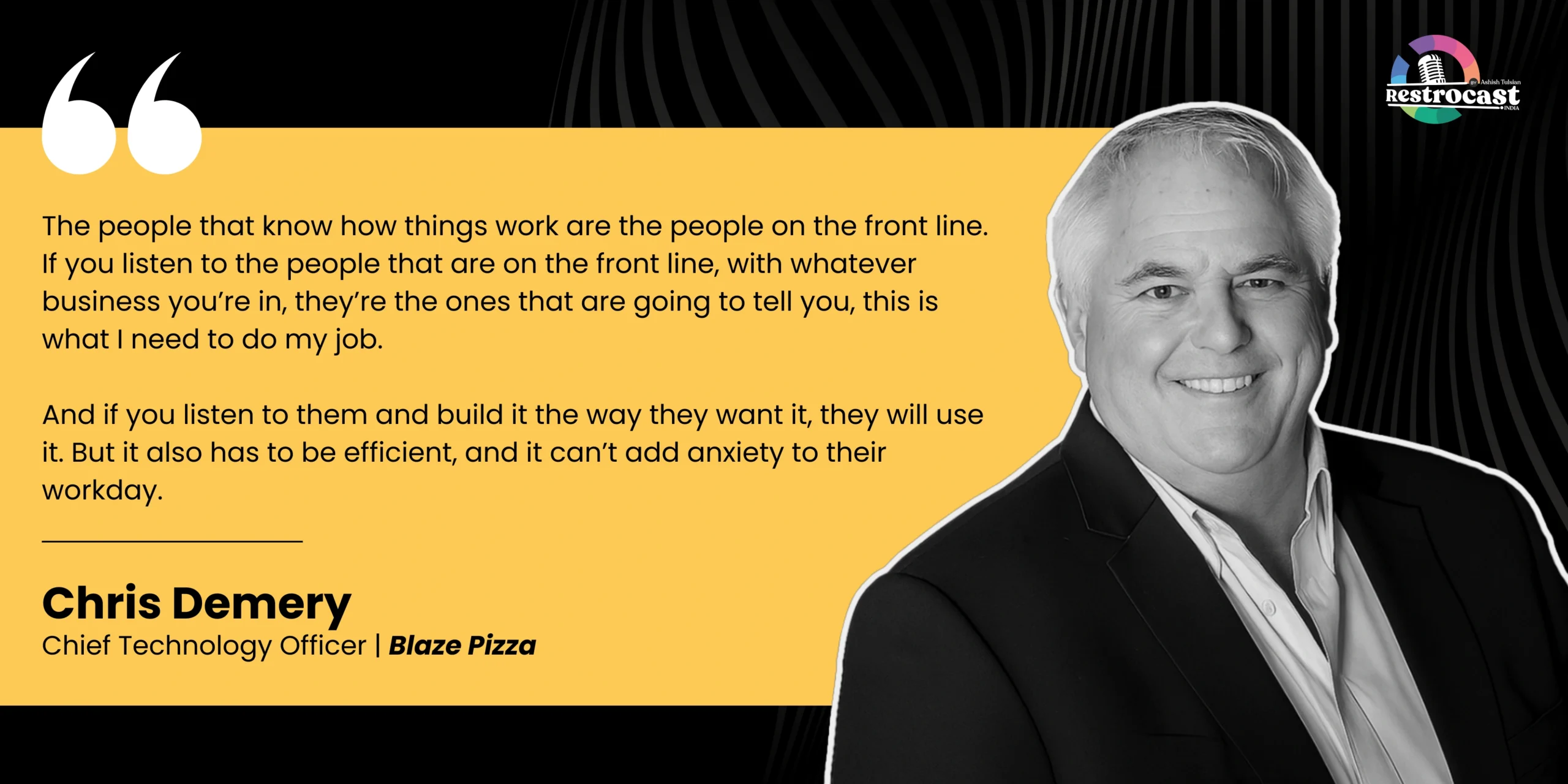
Chris Demery, CTO at Blaze Pizza, also talks about the importance of listening to your employees during implementation. In a conversation on Restrocast, he says-
Contingency Planning for System Failures
During implementation, system failures can disrupt order flow, delay the kitchen, and create gaps. If you don’t plan for it up front, it can even lead to bigger technical and data loss issues. Here are a few steps you can take to ensure service continues even when it happens-
- Keep a rollback option: If a location runs into issues, you should be able to switch back to the previous setup for that outlet without affecting others. This avoids holding up the entire rollout.
- Validate critical data: Double-check menu mapping, pricing, taxes, and or vendor details at each outlet to ensure you’re working with the right data.
- Connect with the vendor: In most cases, vendors provide onboarding support to avoid any issues during implementation. But even if you’re managing implementation internally, don’t wait to escalate the issue and request quick resolution.
- Create data backup: If a system failure erases all your data, that’s a loss that’ll be hard to recover from. Take backups of critical data like menus, recipes, pricing, inventory, customer data, and so on before migration. So even if something breaks, you can restore it quickly.
- Document everything: If a configuration or data issue shows up once, it will likely repeat. Document each issue, feedback, and solution to make it easy to address them correctly.
Successfully implementing restaurant management software comes down to planning and executing the rollout. When you standardize your data, involve the right teams, and roll out in phases, the system starts working the way it should across all locations.
So take the time to set up the system properly and guide your teams through the transition. That’s what will make the system reliable in day-to-day operations.