











Restroworks named the Best Restaurant POS Software by Gartner Digital Markets. Recognized by Capterra, Software Advice & GetApp for Excellence in 2025. Know More

NEO · Online Orders Integration Middleware (BETA) Manage your digital presence with one AI-powered dashboard

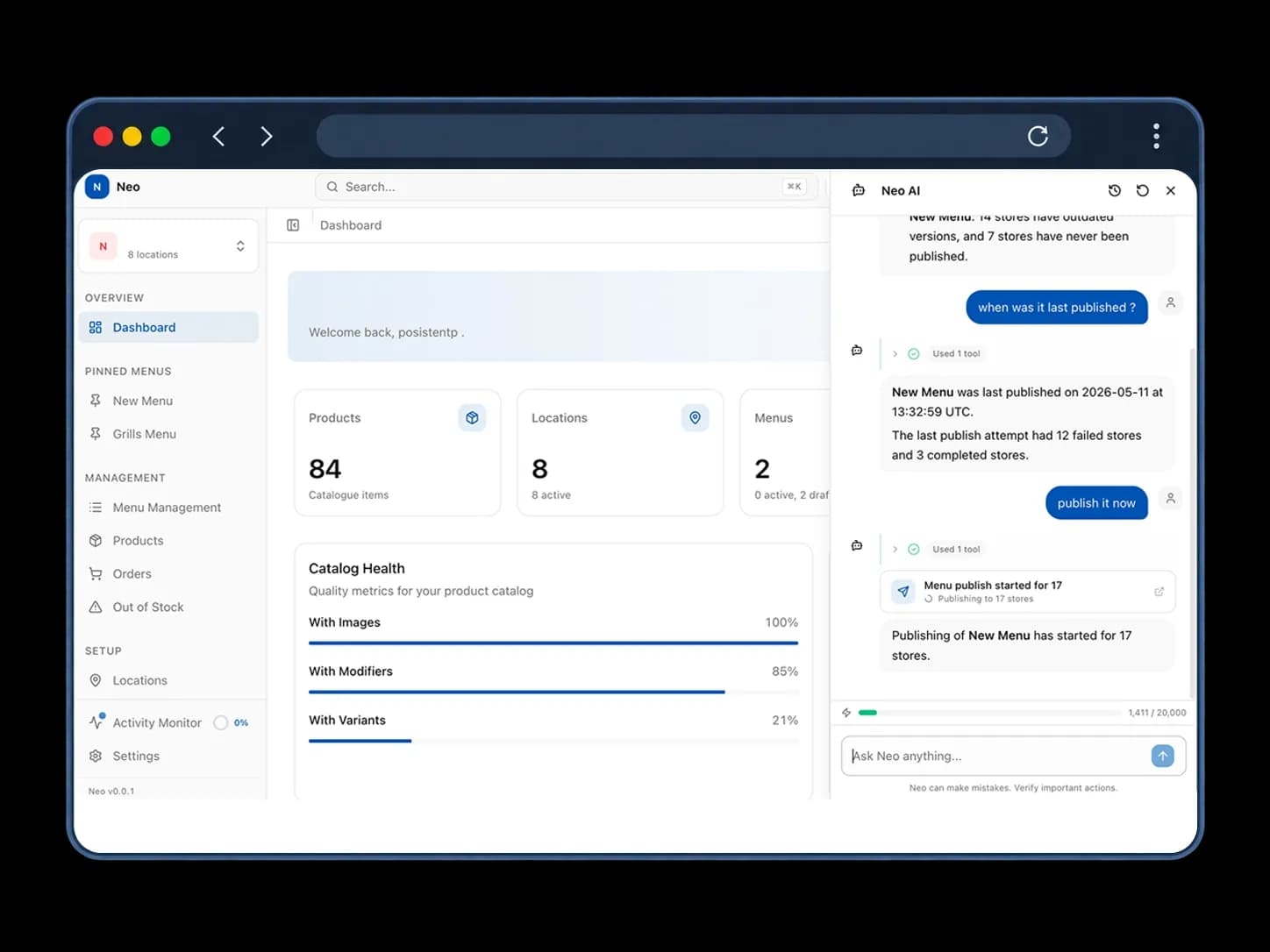
NEO is AI-powered middleware natively connected to Restroworks POS that lets you manage menus and orders across all online channels from one dashboard. Describe menu, price, or offer changes, and NEO executes them within seconds across delivery aggregators, kiosks, QR menus, and your website.

Agentic AI runs the change end to endBuilt natively on your POSOne control for digital channelsApply change to one store or all hundred
Get a Demo
Neo Dashboard
99.99%Order accuracy across aggregators
0third-party vendors in between
98%less manual effort
Taco Bell
Subway
Magnolia bakery
Starbucks
Sbarro
Nandos
Caribou Coffee
Chilis
Denny's
Dunkin
Cinnabon
Hakkasan
Buffalo Wild Wings
Indian Accent
AI MENU & PRICING MANAGEMENT

Your growth team finally owns the digital storefront

Operations team needs speed at the counter. Growth team wants to convert more on DoorDash. NEO gives growth teams the control they need without getting in the other’s way.

Just ask NEO what to do

The same item, different prices

Start small, scale what works

Move fast without breaking the network

The Restroworks experience, in their words

RestroNEXT CX Suite

Everything your customers see, managed with NEO

From the website customers order from to the menu board they read at the counter, NEO gives your growth team one place to manage the digital experience.

RestroWEB- Online Ordering Website

Bring customers straight to your website for delivery and takeout, with a branded ordering experience. Take direct orders, keep the customer data, and build a relationship beyond the marketplace.

RestroSCAN- QR Code Ordering

Turn any table, counter, or room into a QR code ordering point. Customers scan to open the menu, build their order, and it goes through to the kitchen without relying on staff.

RestroGO- Self-Ordering Kiosk

Take more orders without adding another person behind the counter. With a self-service kiosk, customers can browse menu, order, and pay at their own pace while your team gets on with service.


RestroDMB- Digital Menu Boards

Put your menu on a live, dynamic digital menu board. Show combos, offers, featured items, and other high-value items where customers can see them, with menu and pricing updates flowing straight from the POS.

Integrations

500+ integrations across payments, loyalty, CRM and more.

NEO works natively with your POS and integrates with 500+ tools across payments, delivery aggregators, CRM, analytics, or accounting and an open API to bring your entire restaurant tech together.

Browse All 500+ Integrations
Restaurant Formats

Growth looks different from one format to the next

NEO handles it all. Manage your digital storefront across QSRs, cafés, food courts, and other formats under one roof.

Ecosystem

The technology behind every customer interaction

Point of Sale

Take orders, bill customers, collect payments, and keep the front of house moving from one POS. It also ties into the kitchen and inventory to keep your operations smooth.

Table Management

See which tables are open, occupied, reserved, or waiting on a live floor plan. Seat and serve guests much faster.

Reservation & Queue Management

From the first booking to the last walk-in, take bookings and manage seating. Automated status alerts keep no-shows down.

Inventory Management System

Keep tabs on your stock with real-time POS-synced deductions. Get low-stock alerts, track costs, and manage waste for stronger margins.

Kitchen Display System

Give the kitchen a live view of every dine-in or delivery, or takeaway order that needs to go out. Prioritize KOTs, bump a single order and route orders to the right stations.

Recipe Management

Lock in recipes, portion sizes and ingredient usage for your menu items and keep them consistent across brands.

Business Intelligence

Get a closer look into your restaurant’s performance by brand, region, or single outlet, with historical comparisons built in.

Kitchen Production Forecasting System

View item consumption, production, and forecasts on one screen to meet customer demand. AI-powered forecasts help plan production around what each kitchen is likely to need.

Anti-Theft App

View every void, discount, and deleted bill on a central dashboard. Act on potential theft on time.

Cockpit App — Insights on the Go

Keep track of your restaurant, even when you’re on the move. Check sales, covers, top-selling items, and item performance right from your phone.

Why NEO

Middleware natively connected to Restroworks POS. Not bolted on

Most menu middleware sits between two vendors and syncs on their schedule. NEO comes from the same platform as your POS, so your channels show the menu you set.

NATIVE

One system, not two

Your POS already has the menu and pricing. NEO gets the same data instantly, so you don't have to pull, sync, or reconcile your changes later.

INDEPENDENT

Runs on its own

NEO works independently of your POS, not on top of it. So an issue with one doesn’t bring the other channels down with it.

COMPLETE

Every channel is here

Delivery apps are just one part of the picture. NEO also brings your kiosk, QR menu, digital menu boards, and website into the same setup. Consistent experience for customers, simplified control for you.

Take NEO for a spin

Get on a 30-minute call with us for a hands-on look at how NEO makes menu, pricing, and offer changes across the channels your customers use. No commitment required.

What you'll get on the call
A personalized product walkthrough
Rollout tailored to your business
Implementation roadmap
Time for Q&A with our team
Get started
Customer Reviews

What the people on the floor have to say

Real reviews from restaurant teams on G2 and Capterra.
g2
Ravi K.Manager, Magnolia Bakery · 5.0★
”

The Academy feature is good for our staff to learn the software easily. User-friendly software, easy to use and manage our billing.

capterra
SnehAdmin, Subway · 5.0★
”

The user interface is very easy to understand, and report tracking is also very easy.

capterra
DineshRestaurant Manager, Sbarro · 5.0★
”

Best table view feature supported by Restroworks and fast billing operations with multiple online integrations and very fast support.

g2
Goverdhan R. IT - Architect, Cafe Niloufer · 5.0★
”

User-friendly and very Flexible for operations. Easy way to do billing and customizable for many formats.

capterra
VijilIT Supervisor, Cafe Lilou · 5.0★
”

Order punching flow has saved our time and made the process much faster. We have integrated our posist with a BI tool to get reporting at a mass level.

G2 rating badge
Nikshith G.Manager, Taco Bell · 4.0★
”

Application rollout has been done very smoothly by the Restroworks team.

g2
Rahul S.Manager, Harley’s · 5.0★
”

It is very user-friendly and easy to learn. It also provides detailed reports for checking our daily sales in different categories.

capterra
ManishaChef, Sbarro · 5.0★
”

The software is easy to use. Settling the bill is also easy. We can take details from the client before settling a bill, and the same details are reflected in the bill print.

capterra
RajenRestaurant Manager, Hot Breads · 5.0★
”

The application is very easy to explain to the staff members, and we also find it easy to find solutions to any problem.

G2 rating badge
Roanjoy D.Cash and Property Management Supervisor, Global Officium · 5.0★
”

The user interface is intuitive and user-friendly, especially for the front-end users like cashiers and supervisors. The layout is clean, and the functions are logically categorized, making it easier to process transactions and view reports.

And Customers Love Us

leader-g2
g2-spring-2026-momentum-leader
Leader-ENTERPRISE
g2-spring-2026-gamification-momentumleader-leader
Easiest-Setup-ENTERPRISE-g2
#1 Rated Restaurant Management Software on G2
g2
FAQ

Frequently Asked Questions

Questions restaurants usually ask us before getting started

Read summarized version withChatgptClaudeGeminiPerplexity
How much does NEO cost?
Pricing depends on the number of locations and channels you run. Book a quick 15-minute call with our team to discuss your restaurant workflows and get a tailored quote.
Do I need to be on Restroworks POS to use NEO?
Yes. NEO is middleware built natively for Restroworks POS. It works from the same menu and pricing data, with no third-party vendor or reconciliation step in between. It isn't available on other POS platforms.
If our POS goes down, what happens to NEO?
NEO keeps running as usual. Since the two systems operate independently, your menus across digital channels will stay live and orders keep coming in.
Who actually uses NEO day-to-day?
Usually, it’s your central growth or marketing team to manage the digital storefront centrally. Your store and floor teams will continue working with the POS as they do today.
Why would I need NEO if I can already manage menus in my POS?
Your POS manages the menu and pricing your restaurant runs on. On the other hand, NEO manages what customers see on delivery platforms, kiosks, QR menus, and your website. This includes your menus, channel-specific pricing, offers and availability. So, it's the same data underneath, just two different jobs.
Which channels can I manage through NEO?
NEO covers major US delivery platforms, along with kiosks, QR menus, digital menu boards, and your website.
What if someone makes the wrong change across the network?
You can set roles and approvals to verify network-wide changes before they go live. If something wrong does go out, you can roll back a single change or an entire publish, with every change logged for complete visibility.

Still have questions ?

Let's talk — book a 15-minute intro call with our team.

Power up your restaurant operations today

Join 30,000+ restaurants across 52+ countries running on one platform — built for scale, deployed in days.

Hardware agnostic24*7 reliable supportSOC 2, GDPR and ISO 27001 certified
Restroworks